Basic Controllers
Mozi's Rig features intuitive basic controllers that are easy to understand and master. Their functions are immediately apparent without extensive explanation.
This guide is designed for users who prefer quick-start solutions or are still in the theoretical exploration phase before practical implementation.
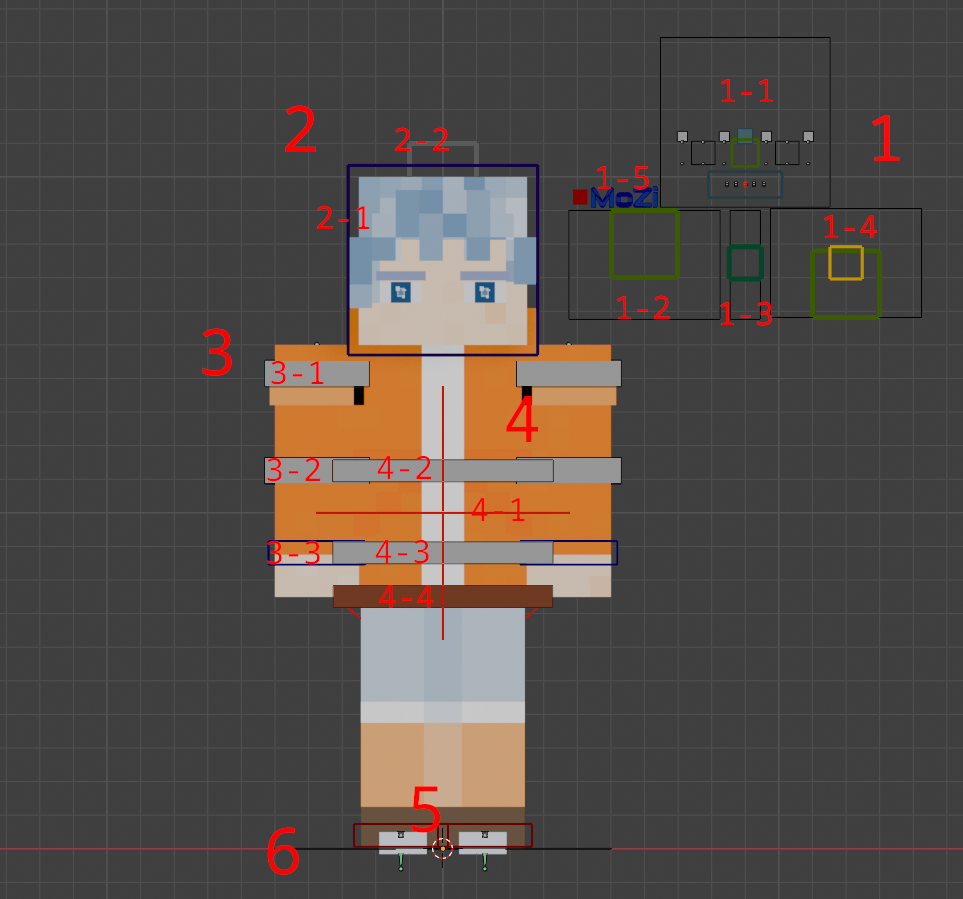
Facial Panel & Properties
- 1-1 Fine Facial Controls (also adjusts facial layout/size when face_layout is enabled)
- 1-2 Blink Control
- 1-3 Expression Control (pull up for smile, down for frown)
- 1-4 Mouth Controllers (green: jaw open/close, yellow: lip corners)
- 1-5 Properties Panel access (red cube: IK/FK switch, blue Mozi logo: essential miscellaneous controls, green cube: physics properties in specific models)
Head Controllers
- 2-1 Head Rotation/Position Control (blue wireframe)
- 2-2 Head Stretch (white wireframe - vertical movement)
Arm Dynamics (Currently in FK Mode)
- 3-1 Upper Arm
- 3-2 Forearm
- 3-3 Wrist
Body Controllers
- 4-1 Root Controller (red cross #1)
- 4-2 Upper Body Controller
- 4-3 Lower Body Controller
- 4-4 Center of Gravity Controller (originally named Hip Controller for backward compatibility)
Leg Controllers (Currently in IK Mode)
Root Controller (#0)